
Booklists & Laptops
For more information get in touch with our friendly front office staff.
On this page you will find our Booklist information and FAQS, followed by BYOD information and FAQS.
booklists
2027 Booklist (Opens Wednesday 4 November): click here to order
If you have any questions or purchasing needs please email library@rowvillesc.vic.edu.au for information.
BOOKLIST FAQS
Which booklist and subjects should I be selecting for my child?
Select the booklist according to the Year level and RSC program your child is enrolled in. For example, if your child is in Year 9 RSA, select “Year 9 RSA 2026”.
Where your child is in Years 9-12, you / your child will receive an email to confirm their subject selections. Please check the course confirmation email prior to purchasing booklist items to ensure you purchase the correct items.
Home delivery is $9.95 per student
FREE postage on all orders placed online by 4 December 2026 that exceed $300 per student order.
Orders are processed as soon as we receive them. Most orders are sent within 10-15 business days. You will receive an SMS & email with tracking details when your order is dispatched.
We cannot guarantee delivery before school resumes for orders placed after 5 January 2027.
Click & collect is $2.95 per student
Most orders are ready to collect within 2-5 business days. You will receive an SMS & email when your order is ready. Please await this notification. Orders cannot be packed on the spot.
Once you are notified, collect your order from: Lilydale Books at Unit 1, 25-27 Hightech Place Lilydale 3140.
You have 5 days to collect your order once all items are ready to collect.
Purchasing Fee or Digital only products?
Digital Delivery: When purchasing digital-only products, you need to select a delivery method. Please note that this is a standard procedure and you will not be charged for any delivery method chosen for digital products. We recommend selecting Click & Collect.
I am having issues with my booklist orders (eg. accessing Lilydale Books, order delays, refunds, etc.)
Please see the FAQs on Lilydale Books website.
If your query cannot be resolved, please contact Lilydale Books directly.
How do I access my eBooks?
All eBooks, including eBooks within textbooks, are accessed through Educational Ebooks. We set up all accounts for students. You don’t need to do anything. Login details are sent to your school email address (or given to you by your school) before the start of Term 1.
To access your eBooks:
1. Go to Educational Ebooks (educationalebooks.com.au).
2. Login with your school credentials.
3. All eBooks that have been purchased will be accessible in your account before school resumes.
For ease of access, we have set up Single Sign-On (SSO) for students which means no additional passwords or logins are required.
If you are still having issues logging in, please see Booklist & Resources Troubleshooting Guide
How do I access Education Perfect?
Education Perfect is a booklisted resource for Years 7-10 and for Years 11-12 (Foundation Maths/Numeracy only).
To access Education Perfect:
- Go to Education Perfect https://www.educationperfect.com/
- Click on “Log in with your school account (SSO)”
- Login with your school credentials
If EP subscriptions are not paid through Lilydale Books (booklister) before Term 1 reopens, students will need to login to EP and click on “Pay Now” to make payment.
If you are still having issues logging in, please see Booklist & Resources Troubleshooting Guide
Bring Your Own Device | Laptops
To support our classroom learning Rowville Secondary College is a BYOD (Bring Your Own Device) school. This means that all year 7-12 students will be required to bring a laptop to school every day. The 2027 Purchasing Portal is open, see details below in the Purchasing Requirements section.
At the beginning of every year we run BYOD onboarding sessions in January for new students. Bookings will open in Term 4.
If you require onboarding during the school year, visit our IT deparment.
Device by program & year level
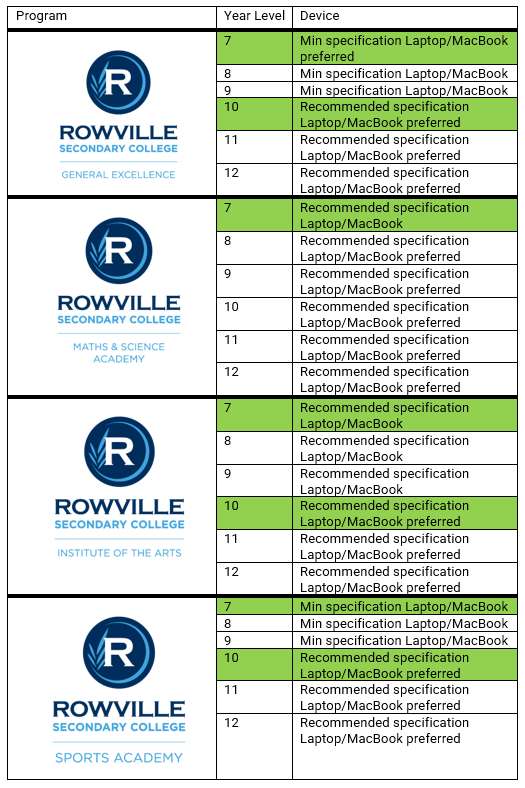
Device Specifications
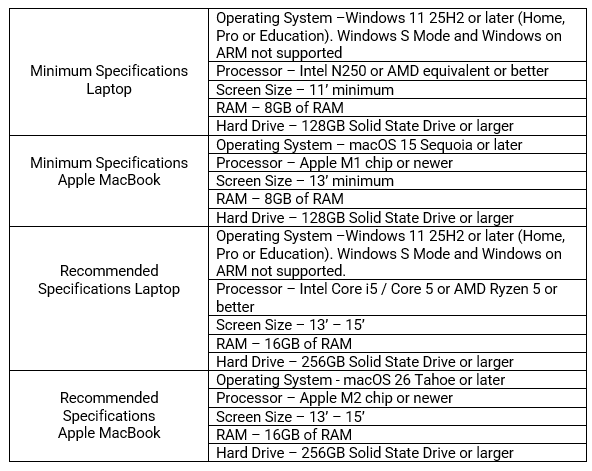
Supported devices
- Windows 11 25H2 or later
- Apple macOS 15 Sequoia or later
- No iPads, Linux, Chromebooks, or Android devices
Purchasing Requirements
SCHOOL CODE: RowvilleSC
The 2027 Purchasing Portal is open.
BYOD FAQS
What is the best way to contact IT for support?
For general enquiries not relating to BYOD please email: helpdesk@rowvillesc.vic.edu.au
For all BYOD enquiries, including advice on purchasing a laptop please email: byod@rowvillesc.vic.edu.au
Please note the BYOD mailbox is only monitored from November through to start of Term 1 the following year.
Do i need to purchase a new device for my child?
If your child already owns a device that meets the requirements, they can bring that to school and will not need to buy a new device.
If I need to buy a device for my child, where should I purchase it from?
- You may purchase devices from any supplier, however, RSC has an agreement with JB Hi Fi solutions – the 2027 Purchasing Portal is open.
- The Purchase Portal will contain a number of options for students at different price points. All of the options will satisfy the minimum required specifications.
JB Hi Fi Solutions Purchasing Portal
SCHOOL CODE: RowvilleSC
What happens if my childs device gets lost or stolen at school?
- Parents are strongly encouraged to consider insurance and warranty cover for BYODs, as they are not covered by the school. Devices purchased through the Purchase Portal will have warranty options.
- RSC has developed policies, protocols and procedures designed to encourage safe and responsible use, but cannot accept responsibility for loss or damage of devices.
How much will BYOD cost?
- We recognise that the purchase of a device is a major decision and a significant expense. A good quality device may last a number of years and viewed over the long term, the total expenses of school are considerably less.
- The purpose of identifying minimum specifications is to allow families to utilise suitable devices that they already own.
- Families currently experiencing financial difficulties, please contact the schools Wellbeing team.
Will my child use the device all the time?
The devices are intended to be used as tools for learning and will be used along with all the other tools available at school and home (e.g. pen, paper, calculators, books, etc).
Will students use devices before school or during breaks?
Devices will be left in lockers during breaks. Students may be involved in special, teacher supervised activities during breaks that require devices. In this case, the teacher-in-charge will manage the children while they collect, use and return their devices.
Will my child still use handwriting?
Yes. Devices will not totally replace handwriting. The mode of communication used will depend on the learning opportunity.
Will internet access be filtered?
Yes. All internet access through the College’s network is filtered using Zscaler, the Victorian Department of Education’s web content filtering solution.
This system helps protect students by restricting access to inappropriate, harmful and potentially unsafe online content. However, due to the constantly changing nature of the internet, no filtering system can guarantee complete protection.
Parents and carers are encouraged to discuss safe and responsible internet use with their children and remain actively involved in their online activities.

Quick Links
OUR PROGRAMS